Ordinary and Golden Rulers
Measure freely with adjustable endpoints, custom colors, and composition markers at 38.2%, 50%, and 61.8%.
 HolyPhi
Visual measurement for Windows
HolyPhi freezes your desktop and turns the captured image into a temporary workspace for rulers, composition guides, and visual analysis.
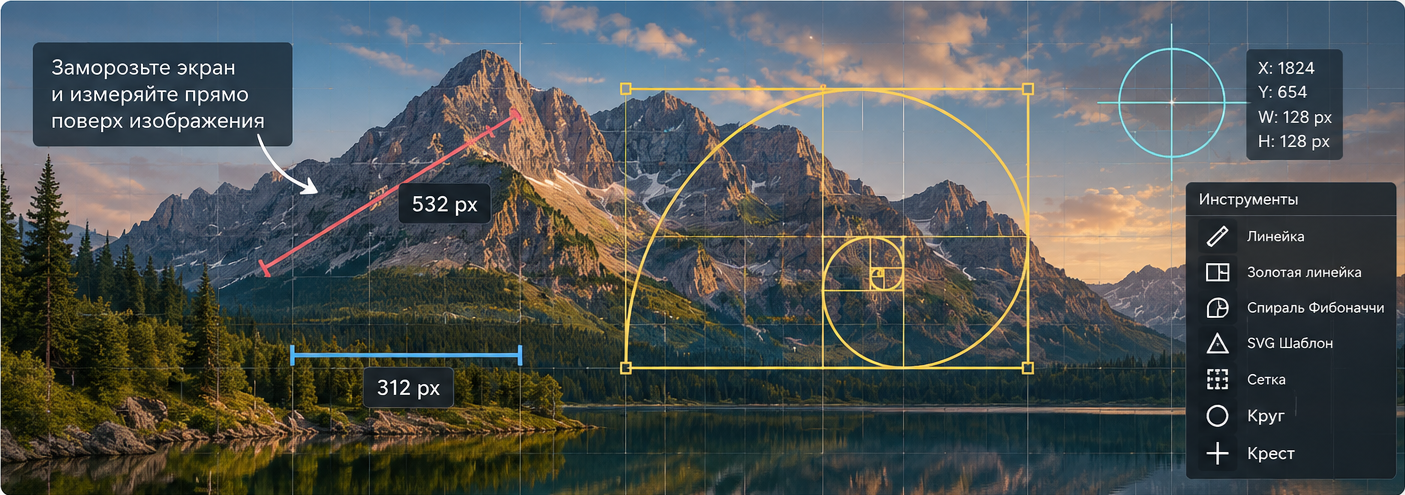
A flexible visual layer
Add measurements directly over a stable capture without changing the application underneath.
Measure freely with adjustable endpoints, custom colors, and composition markers at 38.2%, 50%, and 61.8%.
Add a Fibonacci spiral or rectangle, resize and rotate it proportionally, and flip or recolor it for comparison.
Move objects with the mouse, constrain movement horizontally or vertically with Shift, and manage each item through context menus.
Lock a measurement or template to prevent accidental edits while keeping it available in the global tools menu.
Freeze the complete Windows virtual desktop across all monitors as one continuous scene.
Save the frozen screen together with all visible guides and templates. Editing handles stay outside the exported image.
Simple workflow
Press the global hotkey and freeze the entire Windows desktop.
Add rulers and visual templates, then move, resize, rotate, and recolor them.
Use right-click menus for object-specific actions and lock the elements you want to protect.
Press Ctrl + S to export the complete annotated image as a PNG.
Made for focus
HolyPhi lives in the Windows system tray. Start measurement mode at any time and reopen the startup window whenever you need it.
Esc closes measurement mode without closing the application. If changes remain, you can save or leave without saving before continuing.
Визуальные измерения для Windows
HolyPhi замораживает экран и превращает снимок во временное рабочее пространство для линеек, композиционных направляющих и визуального анализа.
Гибкий визуальный слой
Добавляйте измерения поверх стабильного снимка, не меняя приложение или содержимое экрана под ним.
Измеряйте свободно с подвижными концами, выбранным цветом и композиционными метками на 38.2%, 50% и 61.8%.
Добавляйте спираль или прямоугольник Фибоначчи, изменяйте пропорции, вращайте и отражайте объект для сравнения.
Перемещайте объекты мышью, ограничивайте направление клавишей Shift и управляйте каждым элементом через контекстное меню.
Зафиксируйте линейку или шаблон от случайных изменений и по-прежнему управляйте им через глобальное меню.
Замораживайте весь виртуальный рабочий стол Windows на всех мониторах как одну непрерывную сцену.
Сохраняйте снимок вместе со всеми видимыми направляющими и шаблонами. Рамки выделения не попадают в результат.
Простой рабочий процесс
Нажмите глобальную горячую клавишу и заморозьте весь рабочий стол.
Добавьте линейки и шаблоны, затем перемещайте, масштабируйте, вращайте и меняйте их цвет.
Используйте контекстные меню и заблокируйте элементы, которые нельзя случайно изменить.
Нажмите Ctrl + S, чтобы экспортировать готовое изображение в формате PNG.
Для удобной работы
HolyPhi работает в области уведомлений Windows. Режим измерений запускается в любой момент; стартовое окно можно открыть повторно.
Esc закрывает режим измерений, но не приложение. Если есть несохранённые изменения, можно сохранить или выйти без сохранения.